torstai 16. toukokuuta 2019

Stereo FM receiving with RTL-SDR and Gnuradio - part 2

In the first part of stereo FM broadcast receiving we discussed how to receive mono FM broadcast and how the stereo signal differs.

In this second part I will explain how I made the stereo receiver.

Receiver graph

Following figure shows the finished receiver. I've cleaned it up (e.g. removed some unnecessary waveform displays) to have a clearer view of what is going on. I also added borders and numbers to denote different sections.
Finished stereo FM broadcast receiver


1. FM demodulation

The first section is the FM demodulator. I use the rtl-sdr block to interface with the radio module, then low pass filter the raw data and apply the FM demodulator. This block is the same as with mono receiver, except the demodulator low pass filter must be > 80 kHz and there must be no de-emphasis in this stage. The signal is then resampled to 384 kHz for faster calculations in later stages.

The waveform sources are shown as disabled. If this was used with the ramp waveforms generated with the python script, the raw waveform should look like following.
Raw baseband signal
The red section shows the part where I investigated the clock phase.


2. Delay block

I found out that I need to delay the signal for clock reconstruction by 3 samples. Most likely this is due to the phase shift of the low-pass filters. If the delay was something else than 3 samples, the reconstructed audio signals were completely wrong.

Here is how the clock signals look in the python script:
Clock signals in python script
For example we see that right after 0.00165 s the signal is going down and both clocks (19 kHz and 38 kHz) cross the signal at zero; 19 kHz going down and 38 kHz going up. This is a easily identifiable signal position so we can check the same signals in GRC also.
Clock signals in GRC
As we see, with the delay set to 3 the clocks are generated exactly as in the python script. This produces clean output as we will see later.


3. 19 kHz pilot signal

The 19 kHz pilot signal is first bandpass filtered, to remove all other content from the signal. My understanding is that band pass filter should not cause phase shift at the center frequency, but I'm not completely sure. If it did cause delay, it could be compensated with the delay discussed previously.

The filtered pilot signal is then fed into a PLL to regenerate a clean clock signal with amplitude of 1.0.  The minimum and maxium frequencies are given as radians per sample and are calculated with the variables. I gave something like +-50 Hz range for the PLL.

The bandwidth of the PLL is set to a very small value, by trial and error. I noticed that large bandwidth changed the output from sinusoidal to square wave and also I think the PLL should not respond to fast changes but rather gradually correct any phase or frequency errors. 200e-6 seemed to work fine.


4. 38 kHz carrier

The 38 kHz carrier signal is generated by squaring the PLL output. The resulting waveform contains multiple harmonics and only the 2nd harmonic is bandpass filtered. This results in clean output in the same phase as the PLL output.

I added gain of 2 here, but it could also be added later. The difference signal needs to be doubled in amplitude to give correct output.


5. Difference signal demodulation

The difference (L-R, "stereo") signal is obtained by demodulating the AM signal with the 38 kHz carrier, i.e. multiplying the raw baseband signal with the carrier and then low pass filtering with 15 kHz filter.


6. Sum (mono) signal 

The mono signal (sum, L+R) is got simply be low-pass filtering with 15 kHz the raw baseband signal, in the same way as with the mono receiver.

Now that we have both mono and "stereo" signals, we can compare them to the output of the python script.
Sum and difference signals from python
The previous figure shows the signals in python and the following shows them in GRC. The shape of the "received" waveform closely matches the expected one, except the amplitudes are different. Most likely this is due to normalization in the python script (the total baseband signal was later normalized to peak amplitude of 1, which was not accounted for in figure above).

Sum and difference signals from GRC


7. Channel reconstruction

Now that we seem to have correct data, we can reconstruct the audio signals. Left channel is the sum of the two streams 0.5*(L+R)+0.5*(L-R) =L and right channel is the difference 0.5*(L+R)-0.5*(L+R)=R.

After addition or subtraction, the de-emphasis filter is applied for both channels and they are resampled to 48 kHz and fed to an audio sink. We can still compare the original waveforms from python to what was received.

Original left and right channel data from python
As we see, the received waveforms are correct.
"Received" left and right waveforms in GRC
Now that everything works with the generated baseband signal, we can disable the waveform source and enable rtl-sdr source and the fm demodulator and see that the stereo receiver indeed works.

Conclusion

I uploaded two versions of the receiver to my GitHub.
  • 1st version is the cleand up version without additional waveform displays
  • 2nd version contains the waveform displays that can be used to compare the python script output to GRC.
Both versions have a checkbox to selecte either 75 us or 50 us de-emphasis (first is used in USA, latter in almost everywhere else I think). Honestly I cannot hear any difference between those though...

I also added a checkbox to enable stereo decoding (which changes the "stereo" channel low pass filter gain from 1.0 to 0.0 if stereo is disabled) so that it is easy to compare the audio quality.

Stereo FM receiving with RTL-SDR and Gnuradio - part 1

Receiving FM radio broadcasts is a sufficiently easy entry to software defined radio (e.g. rtl-sdr). The stations are abundant, it is easy to see if everything works properly by listening to the signal and the basic receiver is sufficiently simple. Multiple tutorials exist that show how to do the receiver software, and almost all use Gnuradio companion (GRC). GRC is a software that allows creating a software defined radio by taking different blocks (like demodulators and mixers) from the software's library and wiring them together to produce a complete receiver.

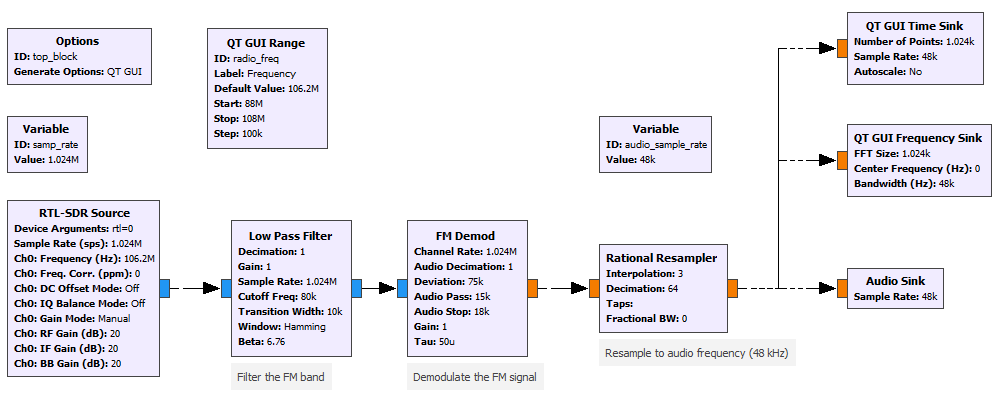
Mono receiver

As shown in the above examples, receiving the basic (mono) FM broadcast is very straightforward. The radio receiver is first tuned to correct center frequency with high enough sampling rate, e.g. 2 Mbps. The signal is then low-pass filtered at around 80...100 kHz so that only the relevant part is left. After filtering, the signal can be FM-demodulated. As described e.g. in Wikipedia, the FM deviation is 75 kHz.

After demodulating the signal, it needs to be low-pass filtered to discard everything but the audio. The bandwidth is 15 kHz, so that is a suitable filter corner frequency. Then the signal just needs to be resampled to e.g. 48 kHz and played out from speakers. Here is my take on the mono FM receiver in GRC. The .grc file can be found from my GitHub.


Mono FM receiver


As can be seen, the receiver is very simple. The FM demodulator block already has a low-pass filter which I use. I also added a slider to select the radio frequency, time sink to show the audio waveform and frequency sink to show the spectrum. The window produced by GRC when running the graph looks like following:
GRC window for FM mono receiver

What about stereo?

So, if receiving mono radio was that simple, receiving stereo cannot be much harder, right? Well actually there is quite some more details that needs to be handled. I didn't really find any good examples on how to do it so I had to study the FM specification as well as GRC to get it done.

The complete spectrum of the demodulated FM radio broadcast looks like following (simplified, generated by my python script which I'll explain later):
Demodulated FM broadcast spectrum

In the spectrum I've marked four regions:
  1. Red: 30 Hz ... 15 kHz is the mono signal. A stereo signal is converted to mono by summing both channels, i.e. mono = left + right
  2. Green: 19 kHz pilot signal. This indicates a stereo broadcast and is important for stereo receiving for other reasons too.
  3. Yellow: 23 ... 38 ... 53 kHz "Stereo" signal. The difference of left and right channels (left-right) is sent here. The difference signal is amplitude modulated to a 38 kHz carrier.
  4. Orange: 55 ... 57 ... 59 kHz Radio Data System (RDS) signal is sent around 57 kHz, taking something like 4 kHz band. We might return to this in later parts.
 What does it mean that the "stereo" signal is AM modulated to 38 kHz carrier, is explained by the modulation equation below. The carrier is just multiplied with the signal and added to the mono audio.
Stereo FM modulation equation (from Wikipedia)


The 38 kHz "stereo" carrier is second multiple of the 19 kHz pilot tone. The 38 kHz is not transmitted at all, so it needs to be recovered with the help of the pilot tone. It is very important that the phase is correct, otherwise the stereo signal is deteriorated and in bad cases reduced back to mono (+-90 degrees phase shift) or reversed (180 degree phase shift).

After the 38 kHz carrier is regenerated, the demodulation can be done simply by multiplying the signal with the carrier, and applying a low pass filter again.

Basic concept for stereo receiving

I came up with following procedure to receive the stereo FM broadcast:
  1. FM demodulate the signal, without low-pass filtering (raw signal)
  2. From the raw signal, low pass filter with 15 kHz filter the mono (L+R) signal
  3. From the raw signal, bandpass filter the 19 kHz pilot tone
  4. Use PLL to recover a clean, phase correct pilot with amplitude of 1.0
  5. Square the PLL output and bandpass filter it at 38 kHz to get the second harmonic
  6. Multiply the raw signal with the now regenerated carrier and low pass filter with 15 kHz filter ("stereo" signal)
  7. Add the mono and "stereo" signals together to reconstruct the left channel
  8. Subtrack the mono and "stereo" signals to reconstruct the right channel
  9. Resample properly to get a 48 kHz audio signal

Python helper

Since it is necessary to recreate the pilot tone and the 38 kHz carrier with correct phase, I wrote a python script that creates a baseband signal (what the FM demodulator would output) as a wav file. Then in GRC I can replace the FM demodulator block with a waveform source and use that to develop the receiver. Since the output of the right side resampled went to multiple blocks, I decided to just resample the wav file to higher sample rate for simplicity.

Rtl-sdr and FM demodulator are disabled and replaced with waveform source

The benefit of this approach is that I know exactly what kind of signals to expect and what is the phase shift between the clocks and the different signals is, and I can easily check whether everything works correctly, e.g. if any filters add phase shift or if some gains are wrong.

In the following part I will show comparison of the output of the python script and what is the output of the GRC receiver.

Note about the de-emphasis

After I got the receiver to work, I had some issues with the stereo signal gain. I had to boost the difference channel gain to something like 30 to get good stereo separation even though there should be no need for additional gain. Turns out the reason was de-emphasis.

FM radio broadcast uses something called pre-emphasis to boost high frequency signals to increase the signal-to-noise ratio. The receiver then applies a de-emphasis, low-pass filter, to restore the original signal. The FM demodulator block in GRC has a "tau" to set the time constant of the de-emphasis filter.

However, only after noticing a detail in figure 3 in this pdf file,  I figured out what was going on.
Figure 3 from the pdf file, emphasis mine


In the figure the HPF (high pass filter) denotes the pre-emphasis filter. I noticed that the filter is applied to tboth audio channels separately! This means the when receiving the broadcast, the FM demodulator must NOT do the de-emphasis. Instead the receiver must first separate both channels and only then apply the filter. After I did this change, the stereo separation became as expected without additional gain.

After this I also added the pre-emphasis to my python script.

In the second part I will explain how I made the stereo receiver.